Modular Table
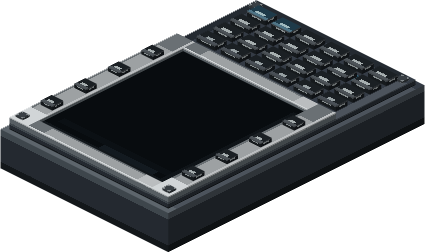
The Modular Table base has a 3×3 exposed grid and can be mounted on any solid face. The CC:Tweaked peripheral name is modular_table; Lua grid coordinates are 1-based. Physical installation and removal are performed in-world, not through Lua. A module's footprint must fit wholly within the grid and overlap no occupied cell. The 2×1 lamp rotates to 1×2 with the scroll wheel; the FMS occupies 2×3.
Lamp modules occupy 1×1 or 2×1 (rotatable to 1×2) and use emissive glass in the module model. This is a visual effect, not dynamic light cast into the world. A buzzer occupies 1×1; its configured volume also scales its sound range proportionally, up to 16 blocks at 100%. Sound is spatial at the module position, including when the table is on a moving Sable sublevel.
Right-click an empty cell with an empty main hand to open the table panel; right-click a lamp or buzzer for its settings. Hold a module and right-click the exposed face to preview and install it. Use the Create Wrench to remove a module. Off-hand actions do not install or remove modules.
Core methods include getGridSize(), getModules(), getSlot(column, row), canFit(column, row, width, height), getOutputs(), getAvailableChannels(), and getPanelStatus(). canFit only queries; out-of-range coordinates raise a Lua error, while a valid footprint crossing the grid returns false.
Additional methods are configureModule(column, row, channel, threshold), configureAlertModule(column, row, source, channel, minimumSeverity), setBuzzerVolume(column, row, percent), applyBasicSetup(), testPanel(), setMuted(muted), setTestSignal(channel, value), setLampTestIntensity(column, row, level), and clearLampTestIntensity(column, row). The test signal activates a module when its value reaches the configured numeric threshold; it is local to this table and is not a sensor/network reading.
Modules can be configured with configureAlertModule(column, row, source, channel, minimumSeverity). source is gpws or test; severity is advisory, caution, or warning. applyBasicSetup() assigns all lamps and buzzers to gpws.any at Caution. For local compatibility signals, use configureModule(...) and setTestSignal(channel, value). setBuzzerVolume(..., percent) accepts 0–100, setMuted(boolean) controls buzzers, and testPanel() runs a three-second test. Lamp preview overrides are temporary and do not create dynamic world light.
local panel = assert(peripheral.find("modular_table"), "Table not found")
print(textutils.serialize(panel.getGridSize()))
panel.applyBasicSetup()
print(textutils.serialize(panel.getOutputs()))

while true do
  local _, attachment, action, module = os.pullEvent("modular_table_changed")
  print(attachment, action, module.type, module.column, module.row)
end
Events include modular_table_changed, modular_table_signal_changed, modular_table_alert_outputs_changed, and modular_table_panel_state_changed. They represent server-confirmed changes. See FMS methods for waypoint access and GPWS for alert configuration. The network bridge, not the table, provides aggregate topology status.