Avionics Wire
Experimental
The Avionics Wire is Experimental content added in 0.2.0. Its parts can be crafted, but their behavior may change.
The Avionics Wire is the avionics network: it carries data between instruments, the sensors, the Avionics Computer and the Modular Table. It is a real wire that hangs between connectors and passes through supports. It is not a block, so it takes no space.
The network carries data only: no power, no redstone. Each instrument still has its own redstone output and Computer Craft peripheral.
Parts
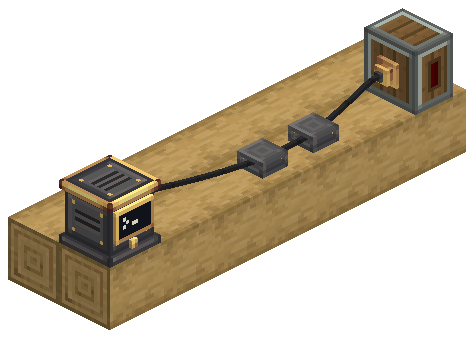
The wire needs three items:
| Item | What it is |
|---|---|
| Wire Connector | A brass socket mounted on a block face. It joins the block it is on to the wire. |
| Wire Support | An industrial iron cleat. The wire passes through it, on floors, walls and ceilings. It carries no data. |
| Avionics Wire | The spool you route with. One item makes 8 blocks of wire. |
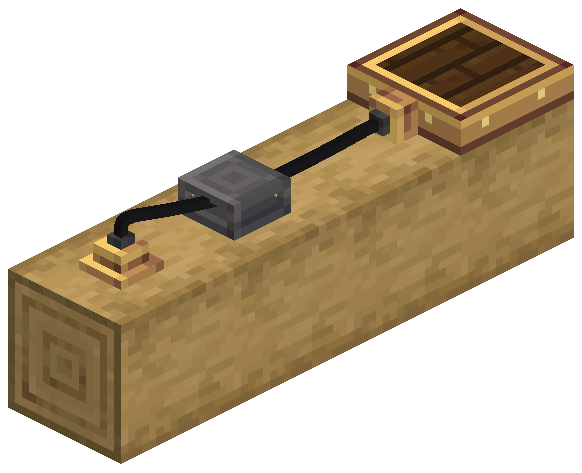
Route a wire
- Mount a Wire Connector on a face of each device you want to join (sensor, Avionics Computer, Modular Table), or on any block to make a junction. On the Radar Altimeter and the Terrain Scanners it seats on a socket on the body.
- Mount Wire Supports on any face along the way.
- Hold the Avionics Wire and use it on the first connector, then on each support in order, then on another connector.
- A ghost wire follows your crosshair with its real shape. It is white when the next click is accepted, and red with the reason when it is not. The length and the cost show under the crosshair.
- Sneak and use in the air to undo the last point. With only the start left, it cancels. Using the start connector again also cancels.
- Creative mode costs nothing.
| Rule | Default |
|---|---|
| Longest span between two points | 24 blocks |
| Points per wire, ends included | 32 |
| Blocks of wire per item | 8 (rounded up per wire) |
| Wires per connector | 4 |
| Wires per support | 3, side by side |
Wires may pass through blocks. Every point of a wire must be on the same structure: the world, or one Aeronautics ship. A wire between a ship and the ground is not possible.
Where connectors sit
- On the edge of a Modular Table, the connector drops its outer flange and centres on the 4-pixel edge.
- A short stem reaches into the block behind the connector, so it also meets devices whose sides are set in, like the Avionics Computer.
Remove a wire
- Breaking a connector or a support removes every wire through it and drops the wire items (not in creative).
- In the Wiring View, sneak and use a Create Wrench on a wire to cut only that wire. Its items go back to your inventory.
- Engineer's Goggles on a connector or support show how many wires it holds and their length.
Wiring View
Press V to toggle the Wiring View. You can rebind it under Controls → Aeronautics: Fly by Instruments. The world dims and every wire, connector and support within 48 blocks is drawn through blocks. Devices with a connector get a marker. Look at a wire to see its length and its network.
| Wire colour | Network |
|---|---|
| Brass | Complete, with two or more devices |
| Grey | Complete but with nothing to talk to, or not connected |
| Red | Reaches an unloaded area, or is too large |
| Faded brass | State not received yet |
| White | The wire under your crosshair |
V is also Simple Voice Chat's default key. Rebind one of them if you use both.
Docked devices
A Modular Table mounted directly on any face of an Avionics Computer, on top or on a side, is docked to it. The two act as one device on the network, with no wire between them. See Modular Table.
Limits
- The network never loads chunks. If it reaches an unloaded area it is incomplete, and devices behind that area are not counted.
- A network visits at most 4096 blocks (
maxAvionicsNetworkBlocks). A larger one reports network too large.
| Server option | Default | What it does |
|---|---|---|
maxAvionicsNetworkBlocks | 4096 | Most connectors and devices one network visits |
wireMaxSpan | 24 | Longest wire span between two points, in blocks |
wireMaxPoints | 32 | Points per wire, ends included |
wireBlocksPerItem | 8 | Blocks of wire one Avionics Wire item makes |