Avionics Computer and GPWS
Experimental
The Avionics Computer is Experimental content added in 0.2.0. It can be crafted, but its behavior may change.
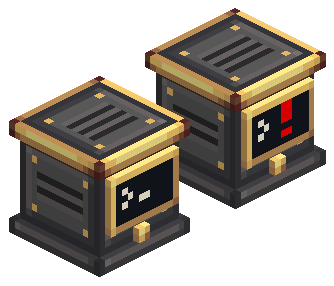
The Avionics Computer is the heart of a craft. It reads every sensor on its network, gives each one a role, and runs a GPWS (Ground Proximity Warning System) on those readings. It warns you about terrain ahead, a fast descent, flying too low or banking too steeply. It is also the Computer Craft entry point for the whole network.
It works like a real GPWS: set it up once, then it just works. There is nothing to arm and no thresholds to edit. The computer is active while it is in the world. You only choose a sensitivity and, if you want, turn individual functions off.
Set it up
- Place the Avionics Computer anywhere on the craft. It faces you when placed.
- Connect it and the sensors to the same network, with the Avionics Wire. A Radar Altimeter is required. Terrain Scanners are optional but add the terrain functions.
- Open each Terrain Scanner's screen and set Looks at to the side of the craft it watches: front, rear, left or right. The computer never guesses the side from how the block is turned. A scanner without a side shows "side not set" on the computer.
- Wire the alerts to a Modular Table with lamps and buzzers, or read them with Computer Craft.
A Modular Table mounted directly on the computer joins its network without any wire.
The block
The front has a small screen and a test button:
| Screen | Meaning |
|---|---|
Blinking cursor >_ | Normal operation |
Blinking amber ! | Caution |
Blinking red ! | Warning, or the self-test |
Steady amber x | GPWS INOP: the computer cannot work (see the screen for the reason) |
A freshly placed computer shows INOP until its first evaluation. Click the button to run a 3-second self-test that raises every function to Warning. Click anywhere else on the block to open its screen.
The screen
- Header: the sensitivity and what matters now:
NORMAL,CAUTION · <function>,WARNING · <function>,GPWS INOP(with the network reason) orSELF-TEST. - Sensors: each sensor with its role and live reading, or its problem: "no recent reading", "other aircraft", "aperture < 45°", "partial sweep", "side not set".
- Functions: each function is active, in caution or warning, INOP with a reason, or inhibited. Click a function to inhibit it or turn it back on. GPWS INOP cannot be inhibited.
- Footer: Sensitivity cycles low → normal → high. Test runs the self-test.
Sensor roles
| Sensor | Role |
|---|---|
| The Radar Altimeter with the lowest valid height | Primary altimeter |
| Other Radar Altimeters | Secondary altimeter |
| Terrain Scanner | Front, rear, left or right scanner: the side chosen in its own screen |
The computer finds the craft's nose from the scanners that have a side: where a front scanner looks, opposite a rear one, or 90° from a side one. The nose aims the Pull up cone and Bank angle. A front scanner with a complete scan and an aperture of at least 45° is what lets Pull up react to terrain ahead. Without one, Pull up only uses the time to ground.
Functions
Values are gameplay values in blocks, blocks per second, seconds and degrees, not real aviation limits.
| Function | Alert |
|---|---|
| Terrain ahead | Caution for a contact within 32 blocks (8 on approach). |
| Pull up | Immediate Warning for a contact within 8 blocks in the 45° forward cone, or 2 seconds or less to the ground while descending. |
| Sink rate | Caution from 6 blocks/s of descent, Warning from 12. |
| Don't sink | Warning after losing 4 blocks or more right after takeoff or during a climb (5-second window). |
| Too low | Away from the ground: Caution at 8 blocks or less, Warning at 3; on approach, 3 and 1. |
| Bank angle | Caution from 30°, Warning from 45°. |
| GPWS INOP | Caution when the network is incomplete, there is no Radar Altimeter, or a sensor failed or stopped reporting. |
- Sensitivity shifts the limits by 20%. High warns earlier: distance limits grow, and the descent, altitude-loss and bank limits shrink.
- Only one alert at a time, the most urgent: Pull up, then Terrain ahead, Too low, Sink rate, Don't sink and Bank angle. Warnings come before cautions. GPWS INOP only shows when no risk alert is active.
- On the ground (very low and almost still for a second) the risk functions stay quiet.
- Alerts need two readings in a row to start and to clear, except Pull up, which fires on the first.
- INOP with a reason: a function that cannot work says why: "no altimeter", "no scanner", "no front scanner", "partial sweep", "no attitude" or "settling". A partial sweep with no contact is never treated as a clear path.
The computer never scans terrain itself and never loads chunks. It uses what the sensors already measured, at the same rate as the sensors.
Older worlds
The GPWS Computer from earlier builds loads as an Avionics Computer and keeps its sensitivity. Profiles, modes and custom rules are gone. Lua programs must use the avionics_computer peripheral instead of gpws.